
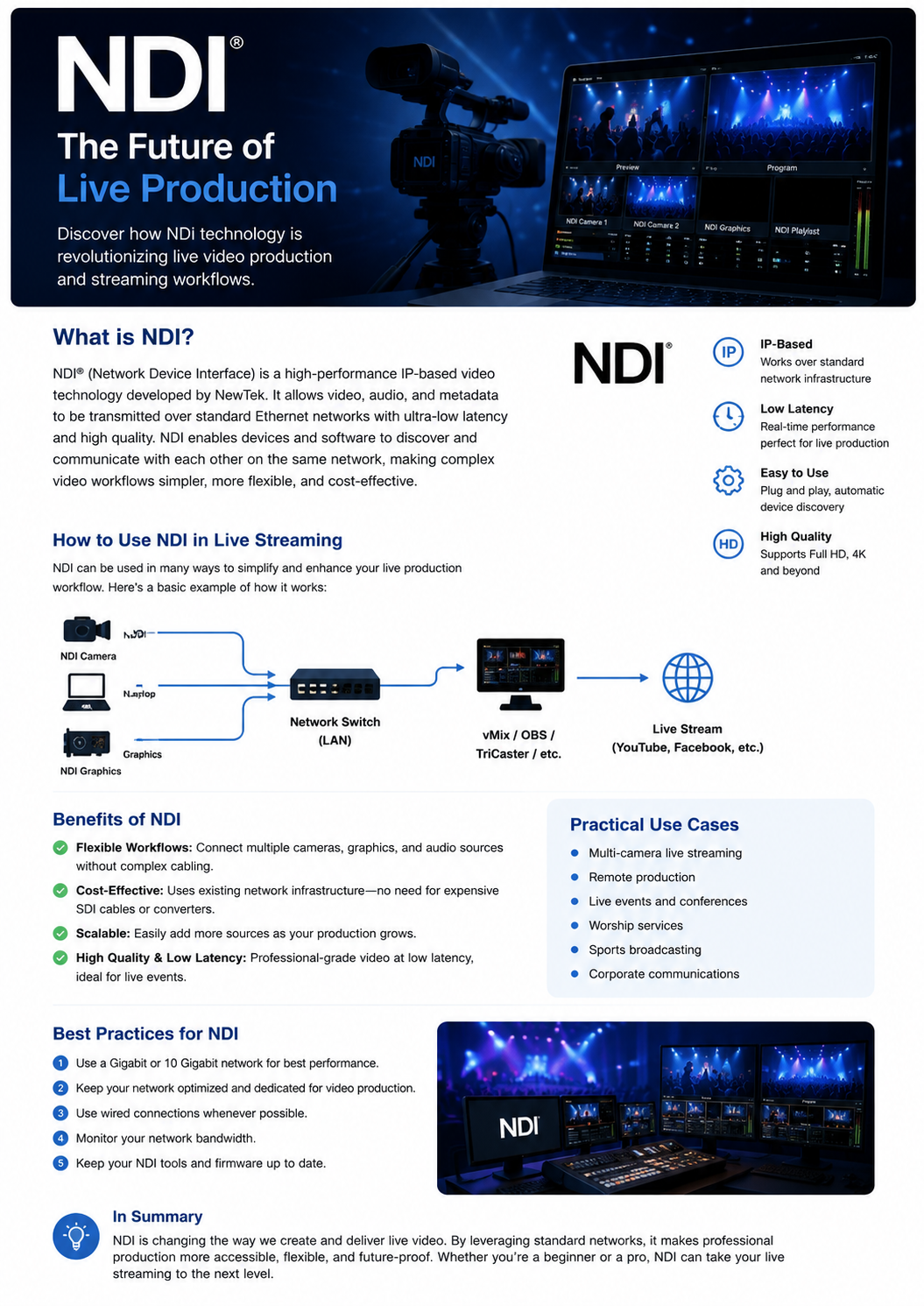
What Is NDI?
NDI (Network Device Interface) is a high-performance IP-based video technology developed by Vizrt. It allows video, audio, and production data to be transmitted over a standard computer network with low latency and high quality.
Instead of connecting every camera and video source directly to a capture card using dedicated cables, NDI allows multiple devices to communicate through the same Ethernet network.
How NDI Works in Live Streaming
NDI can significantly simplify a live production workflow. Cameras, computers, graphics systems, and other video sources can send their signals through a local network to production software such as vMix, OBS Studio, or TriCaster.
A typical workflow looks like this:
NDI Camera → Network Switch → vMix / OBS → Live Streaming Platform
For example, several NDI cameras can be connected to a Gigabit network switch. The production computer receives all camera feeds through the network and can then switch between cameras, add graphics, replays, overlays, and other production elements before sending the final program to YouTube, Facebook, or another streaming platform.
Benefits of NDI
Flexible Production
NDI makes it easy to connect cameras, computers, graphics, and other sources without requiring a dedicated cable for every video signal.
Low Latency
NDI is designed for real-time production, making it suitable for sports broadcasting, live events, conferences, and other applications where synchronization is important.
High-Quality Video
NDI supports high-quality video workflows, including Full HD and higher resolutions depending on the NDI format, network, and hardware.
Easy Expansion
Adding another NDI source is usually much simpler than redesigning a traditional SDI-based infrastructure.
Cost-Effective
Because NDI uses standard IP networking, existing Ethernet infrastructure can often be used instead of installing large amounts of dedicated video cabling.
NDI for Sports Broadcasting
NDI is particularly useful for sports production. A production team can connect multiple cameras around a stadium or sports hall and send their feeds to a central vMix or OBS workstation.
For example:
Camera 1 → NDI → Network
Camera 2 → NDI → Network
Camera 3 → NDI → Network
Graphics PC → NDI → Network
Replay System → NDI → Network
All of these sources can then be accessed by the production system, allowing the operator to create a professional broadcast with multiple camera angles, scoreboards, replays, lower thirds, and other graphics.
NDI and vMix / OBS
NDI works especially well with production software such as vMix and OBS Studio. It can be used to send video between computers, receive camera feeds, transmit graphics, and build flexible multi-PC production systems.
For example, one computer can handle graphics while another handles the main production. Both systems can exchange video through the NDI network without requiring additional capture hardware.
What Do You Need?
A basic NDI production setup normally requires:
- NDI-compatible camera or video source
- Production computer
- Gigabit Ethernet network
- Network switch
- vMix, OBS Studio, or compatible production software
- Sufficient network bandwidth
For larger productions with multiple Full HD or 4K sources, a faster network such as 10 Gigabit Ethernet can provide additional bandwidth and stability.
NDI vs Traditional Video Connections
Traditional broadcast systems often rely on dedicated SDI cables and hardware. NDI moves much of this workflow onto an IP network.
This makes NDI particularly attractive for modern studios, sports halls, churches, events, schools, and mobile production environments where flexibility and scalability are important.
Conclusion
NDI has changed the way live video can be produced and distributed. By using standard IP networks, it allows cameras, graphics systems, computers, and other production equipment to communicate efficiently.
For live sports streaming and professional productions using vMix or OBS, NDI can provide a flexible and scalable solution for building multi-camera workflows while reducing the need for complex dedicated video cabling.
No comment